Chrome is the best browser for most people, thanks to its fast, functional UI and seamless integration with other Google services. However, multiple privacy violation reports, including those related to Incognito Mode, have made trusting Google a bit difficult. If you’re concerned about your safety, you don’t have to use Google as your search engine in Chrome.
On all operating systems—macOS, Windows, Android, iOS, and iPadOS—Chromeallows users to change their default search engine to alternatives like Bing, DuckDuckGo, Yahoo, or Yandex. Here’s how:
1. Change the Default Chrome Search Engine on Desktop
Changing search engines on operating systems likemacOS,Windows, andLinuxis pretty easy. Start by clicking on thethree-dot menuto access theSettingsmenu.
InSettings, navigate to theSearch Enginetab on the left side, then click theChangebutton next to Google. Now, select the search engine you want to use as your default.

1.1 Use a Custom Search Engine
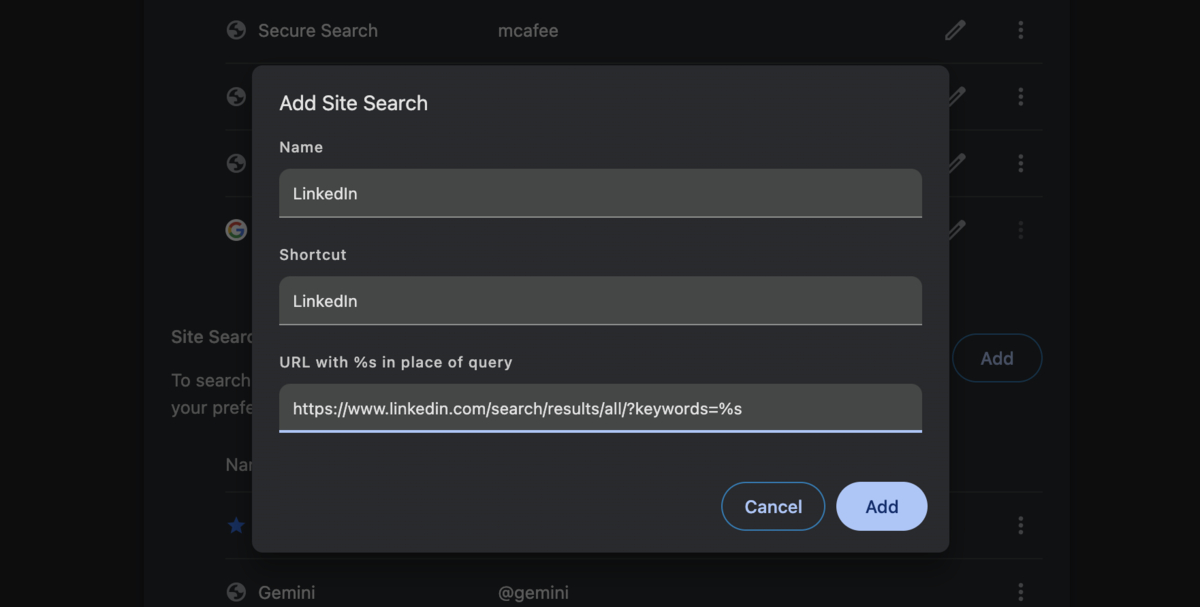
You can add a custom search engine for quick searches on specific websites, such as LinkedIn or Gmail. To do this, navigate back to the Settings menu and head to theSearch Enginetab. From there, click theManage Search Engines and Site Searchbutton, then tapAdd.
You’ll see three input fields:
Click on theAddbutton to add the search engine.
2. Change the Default Chrome Search Engine on Mobile
The process of changing the default search engine is similar on both iOS and Android. However, it’s important to note that you cannot add custom search engines to the mobile version ofChrome.
Start by clicking thethree-dot menuand heading to theSettingstab. Now, navigate to theSearch Enginesection and select your desired one from the list.

Which is the Best Search Engine?
Instead of Google, three other search engines stand out. The first one is Bing. Made by Microsoft, the Chromium-based search engine offers a new UI, AI Copilot, and better integration with other Microsoft products. It also gives out rewards or searching, which can be redeemed for gift cards, Xbox credits, and more.
If you care more about privacy, then there is nothing better than DuckDuckGo. It does not track your searches or store personal data, eliminating personalized ads and trackers. On the other hand, if you hate ads, then Brave is a great alternative. It has a built-in ad-blocker allowing users to watch YouTube videos ad-free. Plus, Brave does not rely on Google or Bing’s search index.

Frequently Asked Questions (FAQs)
As long as the search engine supports query strings, you’re able to add it manually using the method above.
Yes, just follow the same steps as above and set the search engine back to Google.
No, your bookmarks and history stay the same. Only the default search in the address bar changes.
